The Album for Everyone
QR code wedding photos: how it works (and how to do it right)
Updated: 29 July 2026
A QR code on every table and you are set: your guests scan with their phone camera and upload their wedding photos and videos to a private album, with no app to install and no sign-up. Here is how QR code wedding photos work, how they differ from a "free" QR from a generic generator, and the mistakes worth avoiding before you print anything.
What a QR code for wedding photos is and how it works
The idea is simple: instead of chasing every guest through a group chat after the wedding, you put a QR code in plain sight that leads straight to your album. Every photo they take can land in the same place that very night. With The Album for Everyone from Dots it works in three steps:
- You create the album. You set up your wedding's private album and get its unique QR code. It is a one-time payment (from €24.90), with no subscriptions.
- You print the QR on cards or a sign. A card on each table, one at the bar and one at the photo booth work far better than a single sign at the entrance.
- Guests scan and upload. They point their phone camera, the album opens in the browser and they upload their photos and videos. No app, no account.
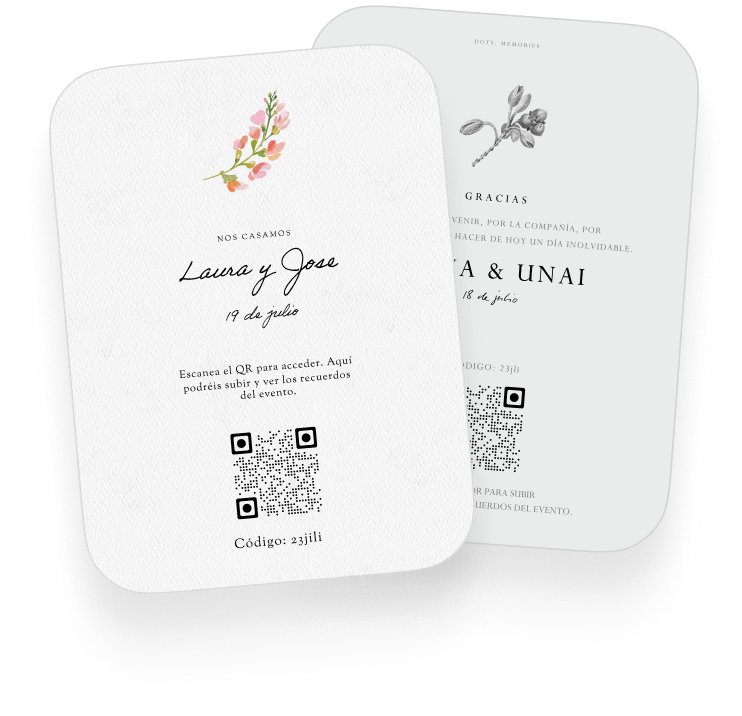
If you want format and wording ideas for the cards, and to see the full plans, head to The Album for Everyone.
Generic-generator QR or private-album QR?
If you search for "free wedding photo QR code", you will mostly find generic QR generators. Mind the difference: those generators only turn a link into a scannable image. You have to put the album behind it yourself, usually a Google Drive folder or a shared Google Photos album. And that is where things change:
| Generic QR → Google Photos / Drive | Private-album QR (Dots) | |
|---|---|---|
| Privacy | In a link-shared Google Photos album, anyone with the link can see every photo and add content, according to Google's own help. | A private event album: only people with your wedding's QR or access code get in. |
| Order | A folder where everything piles up mixed together; sorting and removing duplicates is on you. | Everything gathered in the wedding album, made to be enjoyed as a keepsake, not a folder. |
| Videos | Yes, but they use up the storage of whichever Google account shares the link. | Photos and videos included in the plan, without draining anyone's personal storage. |
| Who can see what | With a public link, everyone sees everything from minute one and the link can be forwarded outside the wedding. | The album is yours: you create it, you decide who it is shared with. |
| QR expiry | The "dynamic" QRs from free-trial generators can stop working when the trial or account ends, even once they are printed. | One-time payment: there is no subscription to keep up for the QR to keep leading to your album. |
A generic generator can do for a one-off. But if the QR is printed on 20 cards and your wedding photos depend on it, it is worth pointing it at a private album that does not rely on a subscription someone forgets to renew.
Common QR mistakes (easy to avoid)
- Printing it too small or with poor contrast. A QR under 2-3 cm, on a dark background or in light ink, fails right when people are in a hurry. Print a test and scan it with two or three different phones before ordering the cards.
- Putting a single sign at the entrance. People see it on arrival, think "later" and never come back. Better to put a card on each table, where the hours of photos happen: the reception, the dinner, the dancing.
- Asking for the photos only at the end. If the reminder arrives as guests are leaving, half will upload nothing. Keep the QR visible from the start and, if there is a speech or a game, use it to remind people mid-party.
- Printing a free-trial QR. If the QR is "dynamic" and the generator account expires, the printed code stops working. Check it first: a static QR or your own album's QR does not have that problem.
Frequently asked questions
Is a QR code for wedding photos free?
Generating the QR image can be free; what matters is where it leads. With a generic generator you have to build the album behind it yourself (and watch out for privacy and expiry). With Dots the QR comes included with the private album, which is a one-time payment: €24.90 for Intimate, €49.90 for Classic and €139.99 for Luxe. No subscriptions, no surprises after the wedding.
Do guests need to install an app?
No. They point their phone camera at the QR, the album opens in the browser and they upload their photos and videos directly. They do not need to sign up or create an account either.
What about older or less tech-savvy guests?
Scanning a QR with the camera is an everyday gesture now (it is the same as the menu at many restaurants). Even so, the album cards also include a short written code in case someone prefers to type it, and in practice there is always someone at the table who helps out. The grandparents' photos are often some of the best in the album.
Does the QR code expire?
It depends on how it was made. A static QR never expires: it works as long as the page it points to exists. The "dynamic" QRs from some free-trial generators can be switched off when the trial ends or the account is closed. The QR for your Dots album is tied to a one-time payment, not a subscription, so there is no renewal to forget.
Next step? Take a look at the plans for The Album for Everyone. In ten minutes you can have the album created and the QR ready to print.